Case Tracker US Immigration
- 4.4
- Rating
- 1.00M
- Installs
- Free
- Price

 Analysis by App-foxy
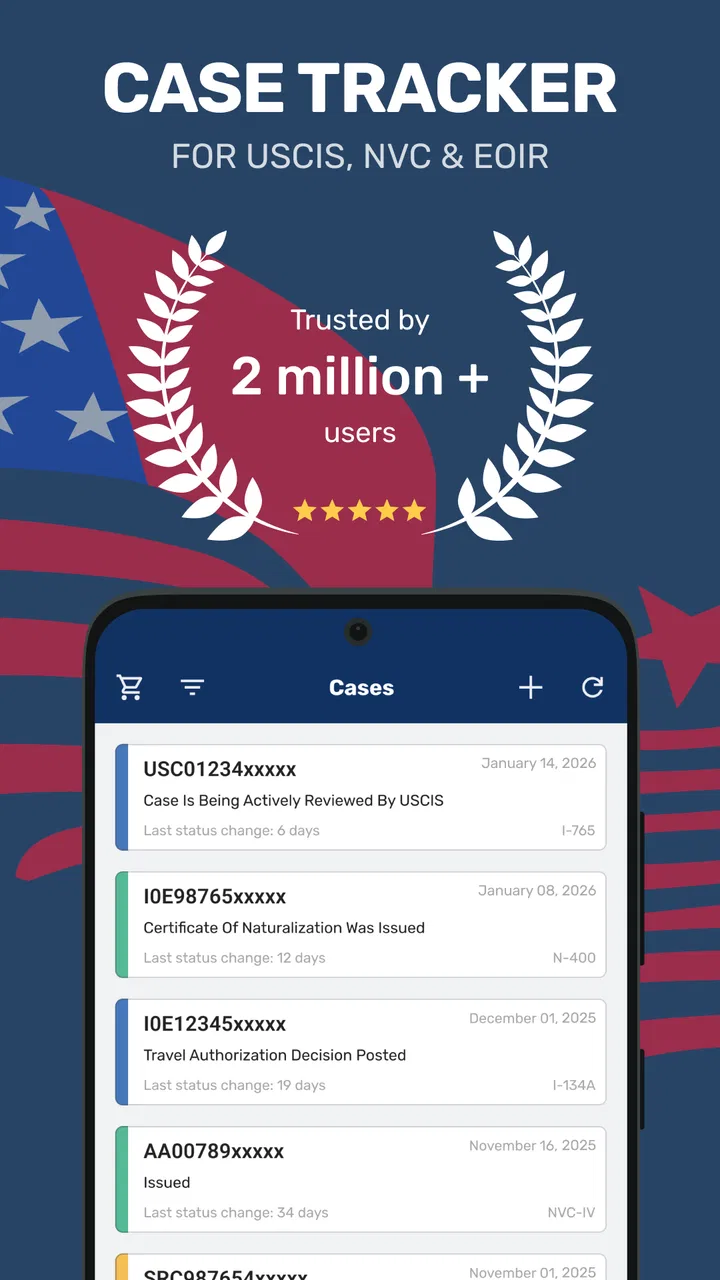
Immigration case tracking is the kind of task that can quietly take over your day. I found myself checking reference numbers, comparing status messages, watching bulletin changes, and wondering whether a long pause meant “normal” or “something to investigate.” Case Tracker US Immigration, developed by ImmiVision, LLC, is built for that exact tension. It is a free tools app for following USCIS, NVC, CBP, and visa-related cases, with bulletin information, citizenship material, and alerts gathered around the same purpose.
My first impression was that it is more useful as a personal monitoring workspace than as a replacement for official immigration channels. That distinction matters. The app can make repeated checking easier and help organize attention around a case, but it does not change government processing, explain every legal situation, or remove the need to read official notices carefully. Used with those limits in mind, it can be a practical companion for applicants, relatives, and people helping someone manage a complicated process.
How the app feels to use when attention and readability matter
The basic value is straightforward: instead of repeatedly opening several unrelated sources, I can use one app to keep immigration-related tracking close at hand. Its short store description, “Case Tracker,” is simple, but the broader purpose is more specific than that label suggests. It is aimed at people who need to follow several parts of the United States immigration system, not just one isolated application.
You May Also Like

 Blood Strike: 2.5 Anniversary
Blood Strike’s Loadouts Turn Every Drop Into a Tactical Gamble
A close look at Blood Strike’s custom loadouts: how fast access to signature weapons reshapes its battle royale rhythm, rewards preparation, and narrows the gap between fights.

 Pandora - Music & Podcasts
Pandora’s Music Is Easy to Start, but Harder to Recover
Pandora’s strength is its low-effort path from a seed to a station. Its weak spot is how much confidence it asks you to place in connection, setup, and quiet recovery.

 8 Ball Pool
 Is Built on Rivalries, Rematches, and Routine
A close look at the rivalries, rematches, shared routines, and unanswered safety questions that turn a quick pool match into a persistent mobile community.

 Samsung Music
’s Quiet Strength Is Playing What You Already Own
Its reach comes less from spectacle than from dependable access to a personal library. That simplicity is both the app’s strongest retention engine and its ceiling.

 AccuWeather: Weather Radar
AccuWeather Review: A Quick, Clear Forecast for Everyday Decisions
For everyday plans, the best forecast is the one you can understand quickly. AccuWeather makes rain timing, radar, and local conditions easy to act on, with a few trade-offs.

 Hill Climb Racing
Why Hill Climb Racing Still Turns Crashes Into One More Run
A tiny car, a bumpy hill and one more upgrade: Hill Climb Racing keeps resurfacing because its simple chaos makes every near-miss feel personal.
More From Our News Desk



Navigation is easiest when I already know what I want to monitor. A user with a USCIS receipt number, an NVC case, or a visa-related reference can approach the app with a clear task and move through the relevant tracking area. The experience is less comfortable for someone who is unfamiliar with immigration terminology and expects the app to explain the entire process from the beginning. I would use it after identifying the correct agency and case type, rather than treating the first screen as a complete tutorial.
That is also where the app’s focus becomes an advantage. It is not trying to be a general news reader, a document scanner, or a broad government-services portal. The emphasis stays on case updates, bulletins, citizenship information, and alerts. For me, that narrower purpose makes repeated visits less mentally expensive than searching the web from scratch every time I want to check something.
Readability has a practical side beyond font size. Immigration information is stressful because a short status phrase can feel more important than it actually is. I found it helpful to slow down and separate three questions: what changed, which agency controls that part of the process, and what action is actually required. The app can bring information together, but it cannot make every government phrase plain English. Anyone who has difficulty processing dense administrative language should keep a trusted person, interpreter, or qualified adviser involved when the wording affects a decision.
The current version is 5.5.6, and the app supports Android 8.0 or later. That makes it available on many older phones, which is relevant for people who cannot replace a device simply to follow a case. Still, an older phone may make scrolling, text entry, or switching between screens more tiring. The app’s compatibility helps, but the comfort of the experience will depend heavily on the device, display, and system settings.
For users who rely on enlarged text, high contrast, or screen-reading tools, I would test the most important workflow before depending on it. In practical terms, that means adding or checking a case, locating an alert, and reading a bulletin without assistance. I would not assume that an app dealing with official information automatically offers perfect support for every accessibility setting. The sensible approach is to keep system text and display options enabled, then confirm that labels and status information remain understandable.
One useful habit is to create a small personal vocabulary before using the app regularly. I write down whether my case belongs to USCIS, NVC, CBP, or a visa process, along with the exact reference details I am permitted to use. This reduces the chance of selecting the wrong tracking path when I am tired or distracted. It is a simple step, but it makes the interface feel much more manageable for users who find unfamiliar categories difficult to remember.
Motor and sensory considerations during repeated checks
Case tracking often involves repetitive actions: entering a number, opening a status, checking an alert, and returning later. That repetition can be tiring for people with limited dexterity, tremors, joint pain, or reduced reach. My advice is to avoid turning the app into a constant checking ritual. Choose a reasonable review routine, use the phone’s built-in keyboard assistance where helpful, and let alerts reduce unnecessary manual visits when they are suitable for your situation.
Alerts are potentially the most valuable feature for people who find frequent tapping or typing difficult. They can shift the workflow from “open and search again” to “review when something deserves attention.” I would still treat an alert as a prompt to verify information, not as the final word. Notifications can be easy to miss, arrive at an inconvenient moment, or be misunderstood when a person is already anxious. For someone with hearing loss, visual notification settings may be more useful than sound; for someone sensitive to interruptions, a quieter schedule may be preferable.
People with sensory sensitivities may also appreciate a deliberate, low-noise routine. Immigration tracking is emotionally loaded, and repeated status checks can amplify stress even when nothing has changed. I found it better to open the app with a specific purpose, read the result once, and record any next step in a separate note. That approach prevents the app from becoming an endless loop of refreshing and helps users who are easily overwhelmed by uncertainty.
A realistic example is a family member helping an applicant who is not comfortable reading English. The helper can check a case, compare the wording with an official notice, and explain the practical meaning in the person’s preferred language. The app may make the checking part easier, but it does not replace communication support. I would never ask a relative to guess at a legal consequence from a short status line; the app is best used to identify what needs closer attention.
Another useful workflow is to separate monitoring from document handling. I would use the tracker to notice a change, then open the official message or paperwork through the appropriate official route before sharing sensitive details. This reduces typing and copying in the tracker while also lowering the risk of treating a summary as a complete record. It is especially helpful for users with limited motor control, because it keeps the app’s repeated input as short and purposeful as possible.
The app is free to install, which removes an initial cost barrier. It includes in-app purchases ranging from $1.99 to $64.99 per item, so I would look carefully at any optional purchase screen before confirming anything. This matters for people managing immigration expenses, users with limited financial flexibility, and families sharing a device or account. The free starting point is welcome, but “free” should not be interpreted as “every possible function has no cost.”
Using the tracker in different real-life situations
The app makes the most sense for people who need a convenient way to monitor one or more immigration-related paths over time. An applicant waiting for a USCIS update may use it for routine checks. A relative in another country may use it to stay aware of a visa-related case. Someone helping several family members may find a dedicated tracker easier than keeping scattered browser tabs and handwritten reminders.
It can also help with bulletin awareness and citizenship-related information, especially when those subjects are part of a broader personal checklist. I would not treat those sections as a substitute for legal advice or official eligibility guidance. Their value is in helping me remember what to investigate and when a change may be relevant, not in making a final decision on my behalf.
Here is the everyday scenario in which I think the app earns its place. Imagine checking a case during a lunch break, receiving an alert later, and then reviewing the official notice at home with the applicant. The tracker reduces the first step to a manageable check. It does not force the person to search multiple sites while standing in a crowded place, using a small screen, or dealing with a poor connection. That situational convenience can matter more than any advanced option.
It is also useful when a caregiver or family member acts as a communication bridge. The person doing the checking can keep the process organized, while the applicant remains involved in interpreting documents and deciding what to do. This shared approach supports people with limited digital confidence, language barriers, or difficulty navigating government websites. The important boundary is consent and privacy: only enter or share case information in a way that the applicant is comfortable with.
For travel or unstable connectivity, I would plan ahead rather than assume the app can replace access to official services. A person may be checking from a workplace, a waiting room, or a location where mobile data is limited. The app can be convenient in those moments, but a status check is only useful if the result can be read accurately and followed up. I would keep essential reference details and official correspondence available through a secure method instead of relying on one app alone.
Users who need a full immigration case-management system may find this tool too narrow. A lawyer, accredited representative, or organization handling many clients may need document workflows, appointment management, detailed notes, permissions, and formal communication records. A general browser can be better when I need to read an entire official page, compare several government instructions, or access a service that the tracker does not directly cover. The app’s strength is focused monitoring, not comprehensive case administration.
Where the inclusive experience still has limits
The biggest remaining barrier is interpretation. A person can successfully open a case and still misunderstand what a status means, whether a bulletin applies to them, or whether an alert calls for immediate action. This is not a small issue. Accessibility includes being able to make sense of information, and immigration language often depends on details outside the short update shown in a tracker.
Language support is another practical concern. Families may use the app across several languages, but the presence of immigration information does not guarantee that every explanation will be equally clear to every reader. If English is difficult, I would use the app as a signal that points to a document or question, then seek a reliable translation or qualified assistance. Guessing from a machine-translated phrase could create more risk than simply taking extra time.
Privacy also affects inclusive use. People with limited digital literacy may not know which case details are sensitive or how to protect a shared phone. I would avoid leaving the app open in public, sharing screenshots casually, or storing identifying information in an unsecured note. A family helper should explain what is being checked and why, rather than quietly managing someone else’s case without their understanding.
Notifications can create unequal experiences as well. A person who depends on visual cues may miss a sound-only reminder, while someone with anxiety may receive too many interruptions and feel pressured to respond immediately. I would customize the phone’s notification behavior and establish a personal rule: an alert starts a verification process; it does not automatically mean that a deadline, approval, or problem exists.
There is also a financial accessibility question. The app’s free entry point is helpful, but optional purchases mean that users should not assume every convenience is included. I would begin with the functions that solve the main tracking need and only consider spending if the benefit is clear. For a person who only checks one case occasionally, paying for extras may not make sense. For someone managing several cases, the convenience could be more valuable, but that is a personal trade-off rather than an automatic recommendation.
The audience size suggests that many people find the app useful: it has an average rating of 4.4 from around 51 thousand ratings, with over 1 million installs. Those figures tell me it has reached a substantial audience, but they do not remove the need to judge whether its workflow suits a particular ability, device, language, or immigration situation. I would use the broad adoption as a reason to investigate the app, not as proof that it will be effortless for everyone.
My inclusive verdict after using it as a monitoring companion
Case Tracker US Immigration is a sensible choice for someone who wants a focused way to watch USCIS, NVC, CBP, or visa-related cases without repeatedly rebuilding the same search routine. I especially like the idea of combining case monitoring with bulletins, citizenship information, and alerts, because those subjects often sit in the same stressful mental space for applicants and families.
Its inclusive value comes less from claiming to solve every accessibility need and more from reducing unnecessary searching. Older Android devices are not immediately excluded because the minimum operating system is 8.0, and the free starting point makes experimentation easier. Alerts may also help users who find repeated typing or navigation tiring. Those are meaningful advantages, particularly when the app is used as one part of a carefully planned routine.
I would recommend it to a person who understands their case type, wants convenient reminders, and is willing to verify important information through official sources. I would recommend involving a trusted helper or qualified professional when language, reading, cognitive load, or legal complexity makes a status difficult to interpret. That is not a weakness unique to this app; it is a reality of immigration tracking that a simple interface cannot erase.
I would skip it if I needed formal case management, extensive document organization, or a complete replacement for government websites and professional guidance. I would also be cautious if optional purchases would create financial pressure or if the app’s text and notification behavior do not work well with my device settings. In those situations, a browser, an official channel, or a human support service may be the better tool.
Overall, I see Case Tracker US Immigration as a practical accessibility-minded convenience rather than a universal solution. It can make the act of checking less scattered, give families a shared starting point, and reduce unnecessary effort in everyday situations. The best results come from using it deliberately: identify the correct case, keep alerts under control, protect personal details, and confirm meaningful changes in official correspondence. With that approach, it earns a place beside—not instead of—the sources and people that make immigration decisions understandable.
FAQs for Case Tracker US Immigration
01What is Case Tracker US Immigration, and what does it do?
Case Tracker US Immigration is a mobile app designed to help users monitor updates related to U.S. immigration applications and petitions. After entering a receipt number, the app can display available case information and notify you when a new update is detected. It is mainly a convenience tool for tracking USCIS-related cases and does not replace official government communication.
02Is Case Tracker US Immigration an official USCIS application?
No. Case Tracker US Immigration is a third-party application and is not operated, sponsored, or endorsed by U.S. Citizenship and Immigration Services. The app generally relies on publicly available case-status information, while USCIS remains the authoritative source for immigration updates. Before making decisions, submitting documents, or responding to notices, users should always verify information through the official USCIS website or correspondence.
03How do I add and track my immigration case in the app?
To track a case, you typically enter the receipt number printed on your USCIS notice, such as a number beginning with letters followed by digits. The app may allow you to save multiple cases, assign names, and enable notifications for status changes. Enter the number carefully, because a single incorrect character can prevent the application from finding the correct case.
04Can Case Tracker US Immigration predict when my case will be approved?
No. The app can show reported status changes, but it cannot guarantee approval dates, interview schedules, processing times, or final decisions. Immigration cases may be delayed by workload, background checks, requests for evidence, interviews, or other circumstances. Any estimated timelines shown should be treated as general information rather than a promise or legal prediction.
05Is my personal information safe when using Case Tracker US Immigration?
Users should review the app’s privacy policy and permissions before adding case information. A USCIS receipt number is not the same as a password, but it is still sensitive case-related data and should not be shared publicly. Avoid entering unnecessary personal details, keep the app updated, and use the official USCIS account or website whenever you need to submit documents or access confidential information.
Pros
- Tracks USCIS case updates in one convenient place.
- Supports multiple immigration cases and receipt numbers.
- Provides clear status history for each application.
- Useful notifications can help users spot case changes quickly.
- Simple interface makes checking cases easy for most users.
Cons
- Not an official USCIS app or a substitute for legal advice.
- Updates may be delayed compared with the USCIS website.
- Some features may require payment or include advertisements.
- Does not explain complex immigration decisions or next steps.
- Requires accurate receipt numbers to retrieve case information.

Case Tracker US Immigration
Gallery